
New starters ready on day one, without the chasing.
Send each new starter one link. They upload their ID and qualifications, type in their bank and tax details, sign your policies and work through the induction on their phone. WorkZerk reminds them about whatever is still missing.
30-day free trial. No credit card.
Sound familiar?
The pack goes out as five attachments
The contract, the handbook, the tax form and the bank details form all go by email, and come back one at a time, half filled in, over two weeks.
Day one and payroll is still waiting
Nobody noticed the bank details never arrived, so the starter is in reception while someone digs through an inbox.
Who signed which version of the policy?
A scanned signature page in a shared folder does not say which version of the code of conduct was accepted, or when.
How staff onboarding works in WorkZerk
- Step 1
Build the starter pack once
Start from the ready-made staff pack for Australia, New Zealand, the UK or the US, then add a sign-off for each policy and your induction as a checklist. Reuse the pack for every starter.
- Step 2
Add the starter, and the link goes out
Each person gets their own portal at a private link. No account, no password, and it works on a phone. Role-specific items only show to the people they apply to.
- Step 3
WorkZerk chases, you approve
Reminders go to anyone who has not finished. You get told if an invite was never opened, and when everyone in the intake is done.
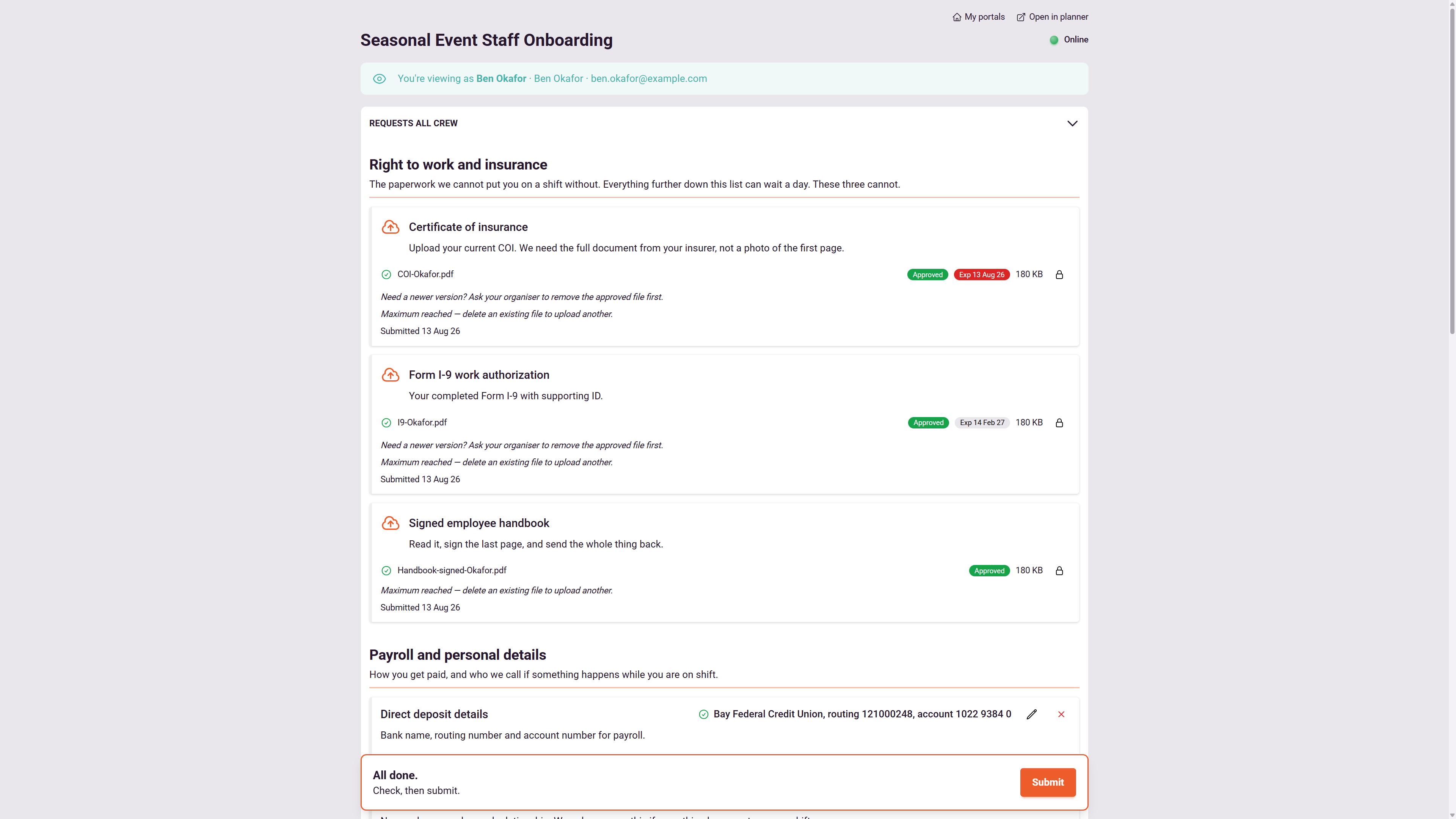
What you can collect from a new starter
- Photo ID and right-to-work documents
- Qualifications and licenses, with expiry dates
- Bank and tax details for payroll
- Emergency contact and address
- Signed employment agreement
- Code of conduct and IT policy sign-offs
- Induction steps, ticked off as they go
- Anything role specific, shown only to that role
- Your own custom fields, saved to their record
Policies accepted by version
Each policy is a versioned terms document. An acceptance records the exact version, the time, and a typed name or drawn signature.
Induction as a checklist
Write the induction once as a workflow. Starters tick steps as they go, so you can see they are three items in, not just unfinished.
Reminders timed to the start date
Set the outstanding requests reminder to fire a few days after the invite, and get an alert when someone has not opened their link.
One record per person
Everything a starter sends lands on their contact record, not in a thread. The next time you need something from them, it starts from there.
Expiry dates keep watching
Require an expiry date on a visa or a license and WorkZerk keeps watching it after onboarding is finished, and flags it before it lapses.
Statuses anyone can read
Offer accepted, paperwork in, ready to start. An automation can set the status when documents are approved, so it never goes stale.
$9.95 a month, every feature included.
25 people can be onboarding at once, with no limit on how many you put through in a year. Colleagues who work in the account with you are $4 a month each.
See pricingQuestions
Is there a ready-made starter pack for my country?
Yes, for Australia, New Zealand, the UK and the US. Each staff pack asks for the tax forms, retirement savings form where there is one, bank details, right to work and an emergency contact, with the official government forms linked. Add it as your own pack and change anything you like.
Does a new starter need to create an account?
No. Each person gets a private link to their own portal. They open it on a phone or computer, fill in what you asked for, and can come back later to finish.
Can different roles get different paperwork?
Yes. Put role-specific items in a section limited to named people, or gated on an answer such as their role. Everyone else never sees them, which keeps each pack short.
Is it an HR or payroll system?
No. WorkZerk collects and keeps the onboarding paperwork and details. Payroll and HR systems stay where they are, and you can export what you collected to CSV.
Can I use it for contractors too?
Yes. The same account runs staff onboarding and contractor compliance. See contractor onboarding for how that side works.
How much does it cost?
One plan at $9.95 a month with every feature. 25 people can be onboarding at once, with no limit on how many you put through in a year. Try it free for 30 days, no credit card.
One account onboards everyone else too
- Contractor onboarding
- Contractor compliance
- Student onboarding
- Patient onboarding
- Client onboarding
- Customer onboarding
- Member onboarding
- Volunteer onboarding
- Supplier onboarding
- Visitor induction
- Guest registration
- Applicant onboarding
- Tenant onboarding
- Attendee registration
- Stallholder applications